
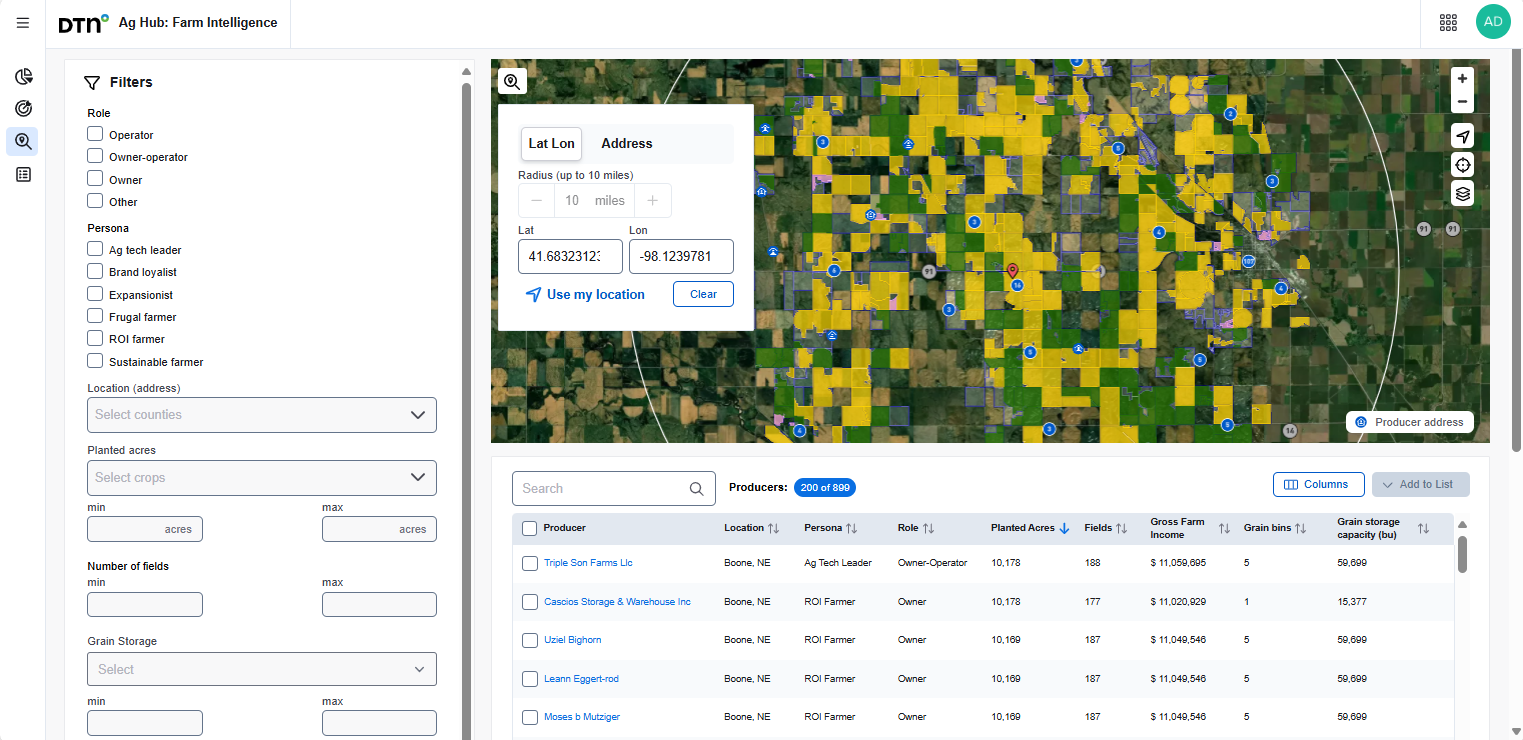
The Search Producers tab allows you to find producers near a specific location. You can do this by:
- Entering a physical address
- Inputting latitude and longitude coordinates
- Using your current location (Location Services must be enabled)
- Drawing a radius on the map
To begin:
- Set the radius by adjusting the number of miles using the + and – icons.
- Choose one of the following methods to define the center of your search area:
- Enter latitude and longitude coordinates
- Type in a physical address
- Click the Use my location button
- Zoom into the desired area on the map and click to set the center point for the radius
A list of nearby producers and fields will be displayed below the map and also overlaid directly on the map for easy reference.
Customizing and Interacting with the Results
- You can narrow down your search results by applying filters in the Filters panel. As you adjust the filters, the results will update in real time.
- You can customize the columns displayed in the results table by clicking the Columns button. Check or uncheck the boxes to show or hide specific columns.
- To sort the list, click the arrows next to any column header.
Viewing Producer Details
- To view more information about a producer, click the blue icon on the map, then select the producer’s name from the list below.